Home Improvement Planner

Selling fast— 93 people bought this in the last 24 hours
Popular right now— 373 people are viewing this product
Top rated— 5.0 stars from 10,679 verified buyers
$67.99 $75.54 −9%
Sale ends in 11:59:59
What you'll get
Instant digital access
Works on any device
Free lifetime updates
30-day refund policy
Try for free with Business Pass
VISA MC AMEX PayPal
HOME & DECOR • HTML PLANNER

Find Out What It Costs Before Anyone Starts

A renovation control centre that holds scope, budget, materials, work packages, timeline and risk in one connected plan — so changing the finish level in one room instantly shows what it does to the total, the reserve, the schedule and the risk.

 
🔥 Every number moves together

A single interactive HTML file that turns “we’re thinking of doing the kitchen” into a plan with a number on it. Set your budget, your date and how much you’ll do yourself, switch on the rooms you want, and it works out the cost, the schedule, the ordering and where the plan is most likely to break.

Made for anyone about to spend a serious amount of money on a house without a single figure written down.

🔓 Get Instant Access

✓ Instant access to the HTML builder

✓ Built to use, not just read

✓ Works on any device, lifetime access

 
SOUND FAMILIAR?

It’s the biggest cheque you’ll write. Usually the least planned

The budget is a number you hope is right

Decided before anyone worked out what the rooms you actually want would come to.

You can’t see what a choice costs

Upgrading one room quietly eats the reserve, adds weeks and shifts the whole finish date — and none of that is visible when you make the call.

Everything arrives in the wrong order

The trades are booked before the materials that take five weeks are ordered, and the schedule slips before demolition even starts.

The overrun was predictable

Thin contingency, too much resting on your own weekends, one room taking most of the money — visible on paper, long before it becomes expensive.

 
SEE IT BEFORE YOU BUY

What opens when you download

Not a spreadsheet you have to build yourself — a connected plan that recalculates as you change your mind, in a single file that runs in your browser.

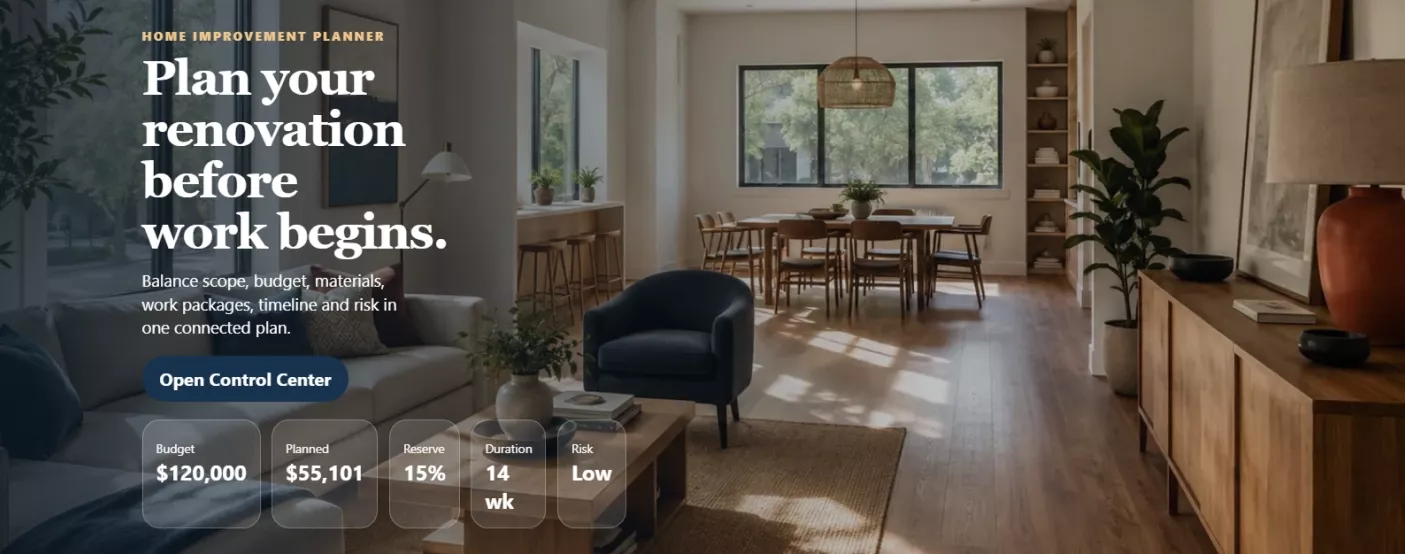
The planner dashboard showing budget, planned total, reserve, duration and risk together

Five numbers, always in view. Budget, planned total, reserve, duration and risk sit together at the top — and every one of them moves the moment you change anything below.

 
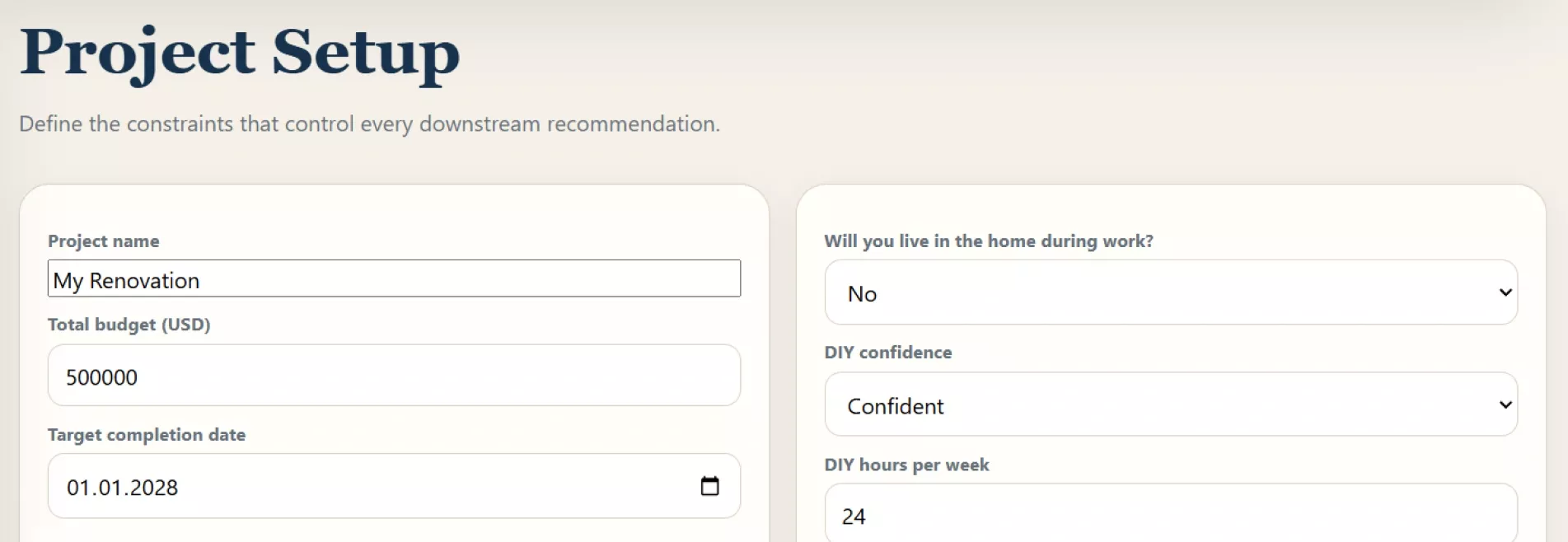
The project setup screen where budget, deadline and DIY capacity are defined

It starts with the constraints, not the wish list. The budget, the date, whether you’re living in the house during the work and how much you can honestly do yourself — every recommendation after this is calculated from those answers.

 
6 things kept in balance 8 phases of work mapped 5 rooms to switch on 100% stays on your device
 
WHAT'S INSIDE

Inside the planner

Six things it settles for you — so the decisions get made while they are still reversible. One room or the whole floor.

01

A total before anyone quotes you


What the work comes to at the scope you actually want, not the one you can afford to guess at.

 
02

Every trade-off made visible


Drop a finish level and see immediately what it buys back in money and in weeks.

 
03

A schedule that admits you live there


Work runs differently around an occupied house, and the timeline says so.

 
04

The risks named while they are still cheap


Flagged on paper, with a fix you can apply rather than a warning you can only read.

 
05

What to order, and how early


The handful of things that hold up everything else if they turn up late.

 
06

It re-plans when reality arrives


Tell it what has actually been spent and how far behind you are, and the outlook is recalculated.

 
ONE EVENING

An evening now, or a surprise in month three

The point isn’t a prettier spreadsheet. It’s finding the expensive problems while they are still just numbers on a screen.

01

Open it

One file in your browser. It runs offline, and nothing you enter leaves your device.

02

Set the constraints first

The budget, the date, whether you’re living there through it, and how many hours a week you’d really put in yourself.

03

Switch on the rooms and move the dials

Finish level and how far you’re taking each room — and watch the total, the reserve and the finish date answer back.

04

Read what it flags, then fix it

The warnings come with a change you can apply on the spot, so the plan improves instead of just worrying you.

05

Come back mid-build

Enter what has actually gone out and how far behind you are, and get an honest read on what’s left.


Stop guessing at it. Put a number on it

Download it, model the renovation tonight, and walk into the first quote knowing what you’re looking at. Instant download, lifetime access, opens in any browser.

🔓 Get Instant Access
 

Planning estimates only — not a quote, a survey or professional building advice. Confirm permits, structural work and written quotes before committing.


At a glance

Format Interactive HTML planner (single file) Access Instant download after checkout
Compatibility Phone, tablet, laptop — any device Structure 10 connected panels
Output A renovation operating plan Figures Planning estimates, shown in USD
Saving Autosaves on your own device Price $PRICE
 
HERE'S EVERYTHING YOU GET

Everything inside — yours for $PRICE

Home Improvement Planner

The whole control centre: setup, rooms, budget, materials, work packages, timeline, risks, mid-build review and the final plan

Included

A materials list with lead times

Every item the rooms need, costed, with the ones that have to be ordered early marked as such

Included

Work packages, mapped out

What each package covers, how complex it is, whether it’s realistically yours or a specialist’s, and what has to happen first

Included

Risk cards you can act on

Each one carries a specific recovery action that changes the plan when you apply it

Included

Your renovation operating plan

The budget, the rooms, the duration and the rules to hold to — assembled from your own decisions

Included

Instant digital download

The file is available the moment your payment clears

Included
Regular price
Your price today
SAVE OFF
$PRICE
 
Download now
 
BEFORE YOU BUY

Questions, answered

How do I get it after paying? +

It's an instant download — the file is available the moment your payment clears, straight from your order confirmation. Nothing ships and there's no email delay.

What devices can I use it on? +

Any device with a browser — phone, tablet or laptop. You open the downloaded file the same way you'd open a web page, and the layout adapts to the screen size.

What's the refund policy? +

Refunds are handled under our store's Refund Policy (30 days), which covers the details for digital access.

Is this a quote for my renovation? +

No, and it doesn't pretend to be. It produces planning estimates from typical cost patterns and the choices you make, which is what you need before anyone quotes — the written quotes still decide the real number.

Does it account for work I'd do myself? +

Yes, room by room. You set how much of each room is yours, and it moves money and weeks in opposite directions — because doing it yourself is cheaper and almost always slower.

What if the plan comes out over budget? +

It tells you by exactly how much, and where the money is concentrated. Then it offers a specific change to close the gap, which you can apply and see recalculated rather than work out yourself.

Does it matter that we'll be living in the house? +

It changes the answer significantly. The schedule stretches, and it flags the combinations that make a house genuinely hard to live in while the work is going on.

Can I plan just one room? +

Yes. Rooms are switched on and off individually, so a single bathroom and a whole-floor renovation both work — everything downstream adjusts to what's active.

Where does everything I enter go? +

It stays on the device you opened the file on. It saves as you type, nothing is uploaded anywhere, and there's no account to make.

Does this replace a builder, architect or surveyor? +

No. It's a planning tool for the decisions you make before and during the work — permits, structural questions and the actual construction still belong to qualified professionals.

Questions, answered

Access is instant. Right after purchase the product appears in your personal account and you get a confirmation email.
Any device with a browser — phone, tablet or desktop. Your access is lifetime.
No. All future updates are included and delivered to your account at no additional charge.
Refunds are handled under the store's Refund Policy: within 30 days, if the product doesn't match its description or you can't access it.
Loading reviews...

Instant Delivery

Upon purchase, you get immediate access via your personal account and a confirmation email.

Returns & Refunds

Refunds are handled under the store's Refund Policy. Within 30 days, a refund may be available if the product doesn't match its description or you can't access it. Once the files have been accessed, refunds for a change of mind aren't available.

Lifetime Updates

Your purchase includes access to all future updates at no additional charge.

Secure Checkout
Instant Access
30-Day Returns

Instant digital access on any device, with free lifetime updates.

Refunds are handled under the store's Refund Policy. Within 30 days, a refund may be available if the product doesn't match its description or you can't access it. Once the files have been accessed, refunds for a change of mind aren't available.